
Why SwissMax is being built beside Swiss-Manager, not against it
Swiss-Manager and Chess-Results already carry a remarkable tournament legacy. SwissMax is an attempt to make the surrounding organizer workflow lighter — without disturbing the trusted official foundation.

Update — 24 September 2026. This article was first published on 30 July 2026, when several of the tools it describes were still plans. We have kept the original reasoning, because it has not changed, and updated the facts in place. Since July, the “score panel” has become the Results area with QR-connected helper phones, winner selection has grown into Winner Studio with 22 graphic styles, certificates have their own rebuilt E-Certificate Studio, and the whole app is organised into seven numbered areas.
SwissMax is still in active development. Companion is RM160 or USD39.99 for one PC with a keyless 14-day trial. The trial is open now; the sale date is still to be announced, and waitlist members get 50% off when sales open.
Compatibility context: SwissMax is independently developed by zonChess. It is not affiliated with or endorsed by Swiss-Manager or Chess-Results. Those names are used to explain the workflow the product is designed to complement.
Swiss-Manager already solves the hardest official problem
Pairing a chess tournament fairly and maintaining the official ranking is not a small task. Swiss-Manager has become deeply trusted because it is stable, FIDE approved and closely connected to Chess-Results. Tournament organizers know where the authoritative pairing and ranking data should come from.
SwissMax is not being built to replace that foundation. The idea is simpler: keep Swiss-Manager as the source of truth, then reduce the repeated work that happens around it. That boundary has not moved since July — SwissMax does not produce pairings or the official ranking, and the arbiter keeps the final word.
Swiss-Manager official website · Chess-Results tournament server
Registration data rarely arrives in a perfect tournament file
Small and medium organizers often receive names through Google Forms, WhatsApp, spreadsheets and last-minute messages. Ratings, IDs, clubs, categories and spelling may use different formats. Someone still needs to clean the data before importing it into the official pairing workflow.
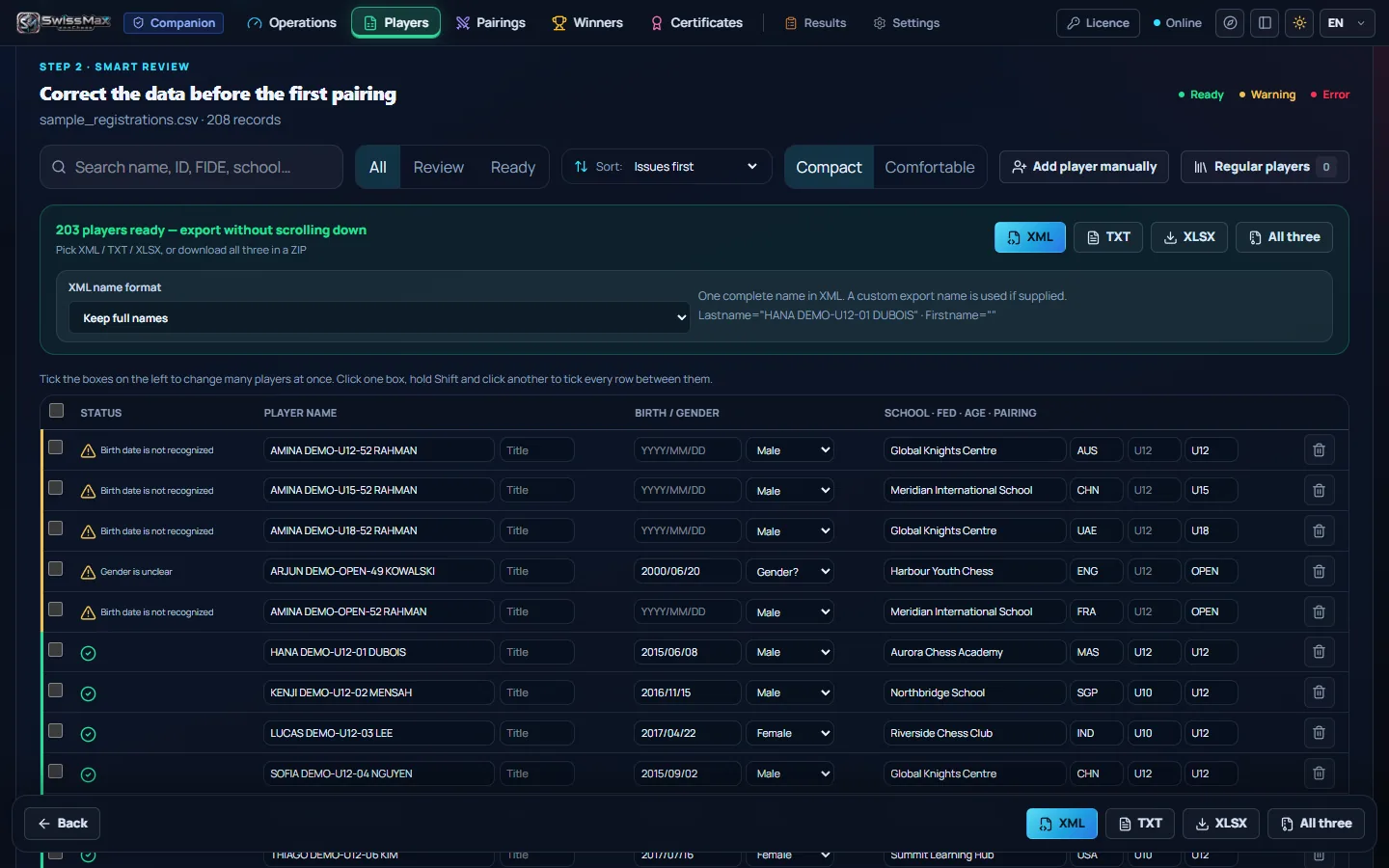
SwissMax was intended to help map columns, check required fields and prepare cleaner player data for Swiss-Manager — without deciding the official pairing. Since then: that is the Players area. Import whatever the form produced — CSV, Excel, ODS, XML, a text-layer PDF, or a paste straight from Google Sheets — and column headings in English or Malay are matched for you. Names, dates of birth, gender, ratings and categories are cleaned, duplicates are flagged, and the list goes out as Swiss-Manager XML, TXT or XLSX. For a small club event, players can also be typed in by hand from an empty workspace.
FIDE and MCF ID matches are confirmed automatically. MCF is the Malaysian Chess Federation, Malaysia’s national rating list. If you organise elsewhere and would like your own federation or club rating handled the same way, tell us which one you use.
The pressure is often communication, not calculation
Once the next round is paired, the organizer may still need to create a readable poster, split a long list into pages, send WhatsApp text, update screens and answer players who cannot find their board.
For a one-person team, those minutes matter. For a multi-section tournament, the same steps repeat across every category. SwissMax aims to turn the published pairing data into clearer communication with fewer manual passes.
Since then: this became the Pairings area. Load a Chess-Results link or a pairing file, choose one of 14 poster templates, and get A4 pages for the wall, the projector or WhatsApp — a 104-board round becomes seven pages, exported as one PNG, a ZIP of every page, or shared with ready-made text. When a round is republished, Refresh & Compare shows exactly which boards changed instead of asking you to re-read the whole list.

Results can arrive from several tables, sections and volunteers
A small event may have one result desk. A larger event may have several scoring stations or runners carrying slips. The difficult part is keeping everyone aligned without creating a second unofficial source of truth.
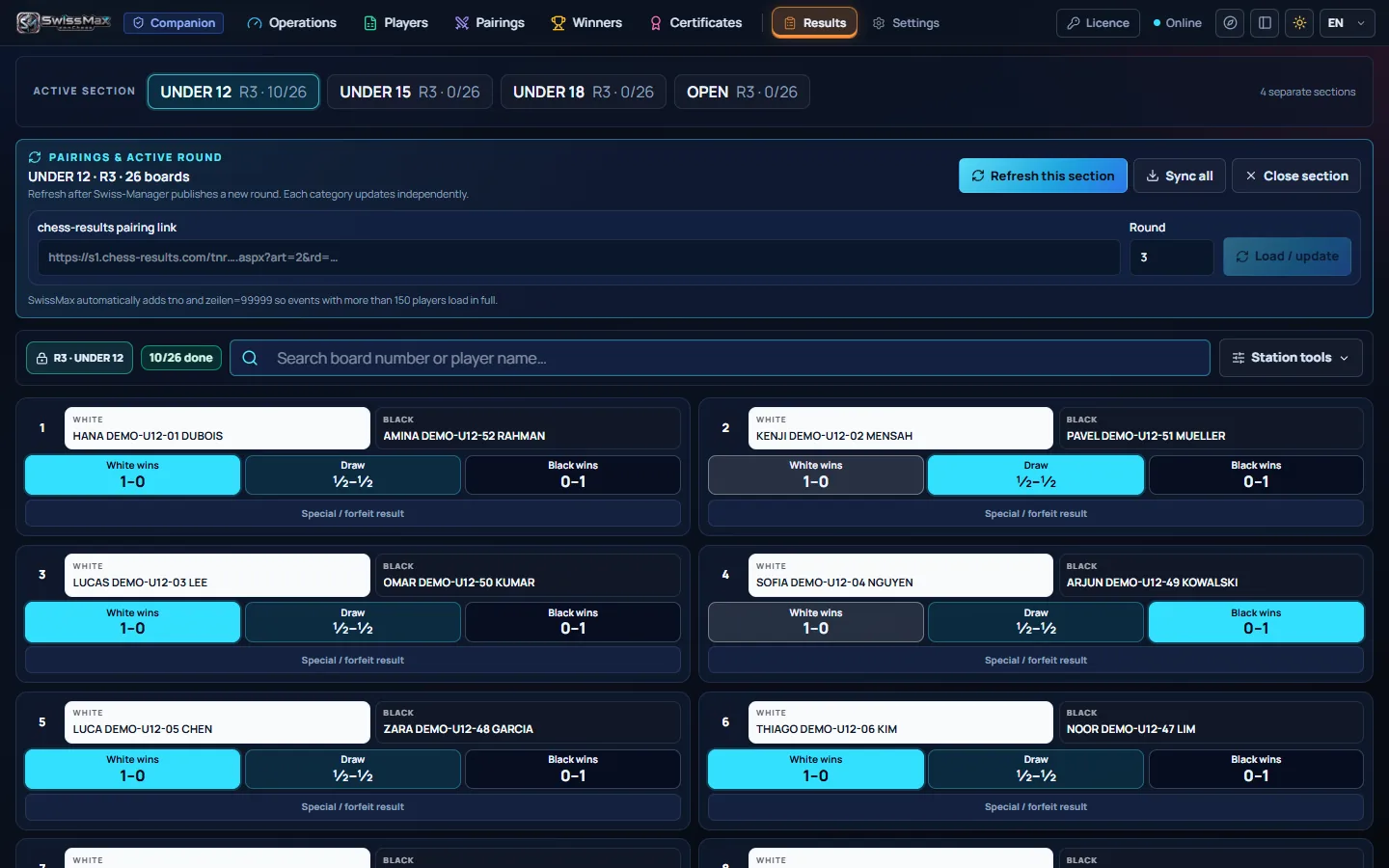
The SwissMax score panel — planned when this was written, now the Results area — is a local-network collection layer. Helper phones join over the venue LAN by QR code, each one locked to a single section, so the U12 and Open boards never cross. It helps the team gather results, while the authorised operator still confirms them and enters the official results in Swiss-Manager.
Every results file SwissMax prepares for that hand-off is tied to its section, round and pairing. A stale or mixed packet is refused, and an incomplete round cannot be exported as official — the tool would rather stop you than hand over the wrong data.
Closing the tournament creates another burst of work
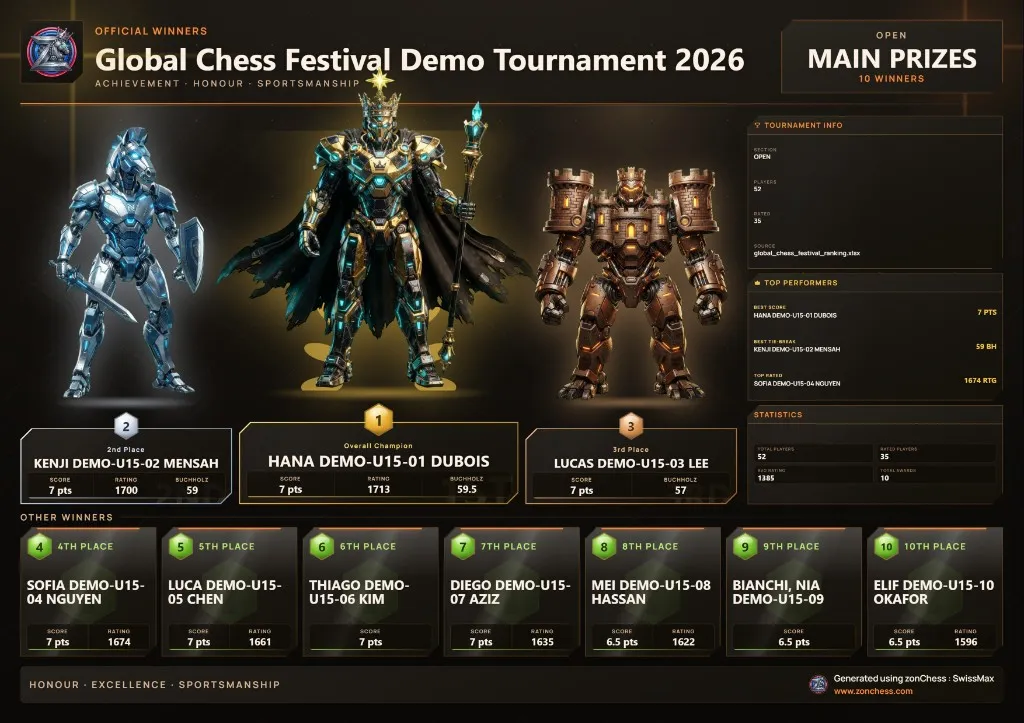
Final rankings need to become category winners, prize lists, certificates, announcement graphics and information that parents or players can understand. Tie-break rules and eligibility still need careful human checking.
SwissMax is being designed to help filter and present final-ranking data, not to silently invent winners. The organizer remains responsible for the award rules and final verification.
Since then: Winner Studio imports the official final ranking, applies the prize scheme you build — overall, category and special prizes, with each duplicate-prize policy explained in plain words — and suggests winners for you to check. From that same verified list come podium and list graphics in 22 styles, and certificates from the rebuilt E-Certificate Studio: 29 templates, wording in English, Bahasa Melayu or 中文, and export as 300-DPI PNG or A4 PDF. Estimated FIDE and MCF rating changes can be previewed too — always labelled as estimates, never as official figures.
The same problem changes shape as an event grows
Small tournament
One organizer may handle registration, pairing communication, scoring and announcements alone.
Medium tournament
Several categories and volunteers create more handoffs, duplicated files and repeated publishing work.
Large tournament
Scale makes consistency, section awareness, permissions and communication more important.
Common thread
The official pairing software may be stable while the surrounding workflow still consumes time and attention.
What SwissMax should do — and what it should leave alone
- Prepare cleaner player data for import into Swiss-Manager.
- Read pairing or ranking data from organizer-approved sources, such as a Chess-Results link or an exported file.
- Create pairing posters and ready-to-send messages.
- Collect results across the venue network for operator confirmation.
- Help prepare winner lists, podium graphics and certificates.
- Leave official pairing, ranking and tournament authority with Swiss-Manager, the arbiter and the organizer.
A focused companion, shaped by real organizer workflows
When this article was first published, the pre-launch build included player-data preparation, pairing communication, a multi-section score panel, organizer profiles, winner selection and graphics. The September 2026 development build organises all of that into seven numbered areas — Operations, Players, Pairings, Results, Standings & Winners, Certificates and Settings — with a bar that always shows the tournament, section, round, last save and last backup.
The next step is still not a grand promise. It is practical validation with organizers who understand the pressure of tournament day, starting with the free 14-day trial. Companion is RM160 or USD39.99 for one PC, with 50% off for waitlist members; the sale date is not decided yet, and we would rather say so plainly than guess. SwissMax is built by one independent developer and chess parent in Malaysia; if something in your tournament day does not fit, tell us — constructive feedback shapes what comes next.
Related reading
Seven areas, real screens
The September 2026 build, area by area, with unedited screenshots.
Preview SwissMax → KIDS & PAIRING PRIDEWhen pairing graphics look like a game screen
Packed halls and refresh storms: why a clear board list helps juniors find their board faster.
Read the article → ORGANIZERSValue-added without starting from zero
Keep the Swiss-Manager skills you have; upgrade the edges around them.
Read the article → WHAT'S NEWWhat's new in SwissMax 1.0
Certificates, a club roster, a real podium and licensing for a hall with no signal.
Read the article →More: pairing posters as a small ceremony · why certificates belong in a tournament tool · estimated ratings and what MCF is · designing a podium that reads correctly · the SwissMax changelog · who builds this