Nov 2026 SwissMax Companion: free 14-day trial for Windows, no key or payment details needed. Download →

SwissMax Companion · for organizers

Swiss-Manager pairs the games. Who handles everything else?

Registrations typed in by hand, pairing sheets nobody can read, result slips carried to the desk, a tired count of who wins what, and a hundred certificates to fill in. That is the tournament behind the tournament. SwissMax Companion takes it off your desk, on your own PC, while Swiss-Manager and the arbiter keep the pairings and the ranking.

Updated

Works beside Swiss-Manager Offline with files Free 14-day trial
  1. Your to-do list SwissMax
  2. Clean 120 registrationsto dodone
  3. Swiss-Manager player fileto dodone
  4. Pairing pages for the wallto dodone
  5. Results from 60 boardsto dodone
  6. Who wins which prizeto dodone
  7. 120 named certificatesto dodone
  8. Winners for the parents' groupto dodone

In short: what SwissMax Companion does for an organizer

SwissMax Companion is a Windows app for the work around Swiss-Manager. It turns a registration form into a clean player file Swiss-Manager imports, turns each published round into readable A4 pairing and result pages, collects board results from helper phones into one file for Swiss-Manager, suggests prize winners from the final ranking under your own prize rules, and prints certificates with every player's name. It does not make pairings or the official ranking: Swiss-Manager and the arbiter keep that authority. It works from a Chess-Results link or offline from Swiss-Manager files, and tournament data stays on your PC.

Need a plan first? The chess tournament organizer checklist covers every step from six weeks out to the rating report.

Beyond saving time

Why players remember your tournament.

Saving hours is half the story. The other half is what players and parents see: their name on a page made for them, winners celebrated properly, a certificate with their own name. Done well, it becomes your event's identity, and a reason players come back.

Pairings read at a glance, with a backup plan

Most of our pairing designs give White and Black their own colour columns, with the board number on both sides, so even a first-time player finds their board without asking. When Chess-Results slows down at the start of a round, the round is already an image and a copy-ready text list for WhatsApp: parents, coaches and players get it anyway.

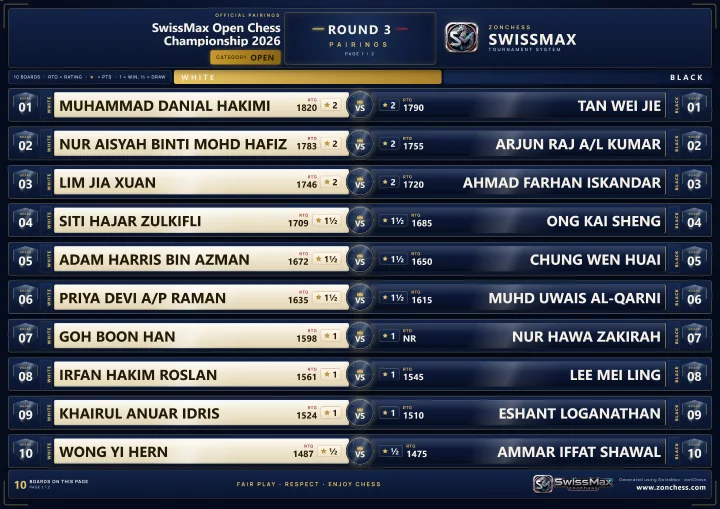
  • White and Black in clearly separated columns, board number on both sides
  • One image per page plus the names as text for the parents' group
  • A page that looks made for the players, not a spreadsheet printout
A SwissMax pairing page in the Cyber Arena design: White names in light panels on the left, Black names in dark panels on the right, the board number on both sides

Drag the handle to compare.

Winners in minutes, celebrated properly

As chess parents, we have waited close to an hour after the last round of a large tournament in Malaysia, with nothing to do but wait for the winners list. With many categories and a tight timetable, that list is also where mistakes happen.

SwissMax applies your prize scheme to the final ranking and fills every slot at once; your time goes into checking, not counting. The winner graphics were reviewed with players before release, so the poster, podium or reveal video celebrates the winners and carries your event's name.

  • Every prize slot filled from the official ranking, one prize per player unless you choose otherwise
  • Ties left to the arbiter, nothing published while a prize is unresolved
  • A podium, a table, a champion spotlight or a reveal video players want to share
A SwissMax winners graphic in the Arena Gold design: champion, runner-up, third place and category winners

Drag the handle to compare.

A certificate with every name

A blank certificate shared in a group can be filled in by anyone, which takes something away from the real winners. eCert Studio puts each player's own name on their certificate, from your ranking or your list, in one batch. For the signature, scan a QR code with a phone, sign on paper and take a photo: it goes straight to your PC over Wi-Fi.

  • Every name filled in, in many scripts, at 300 DPI
  • Real signatures by QR and phone camera, not a pasted image
  • 29 templates or your own design: no designer needed on the night
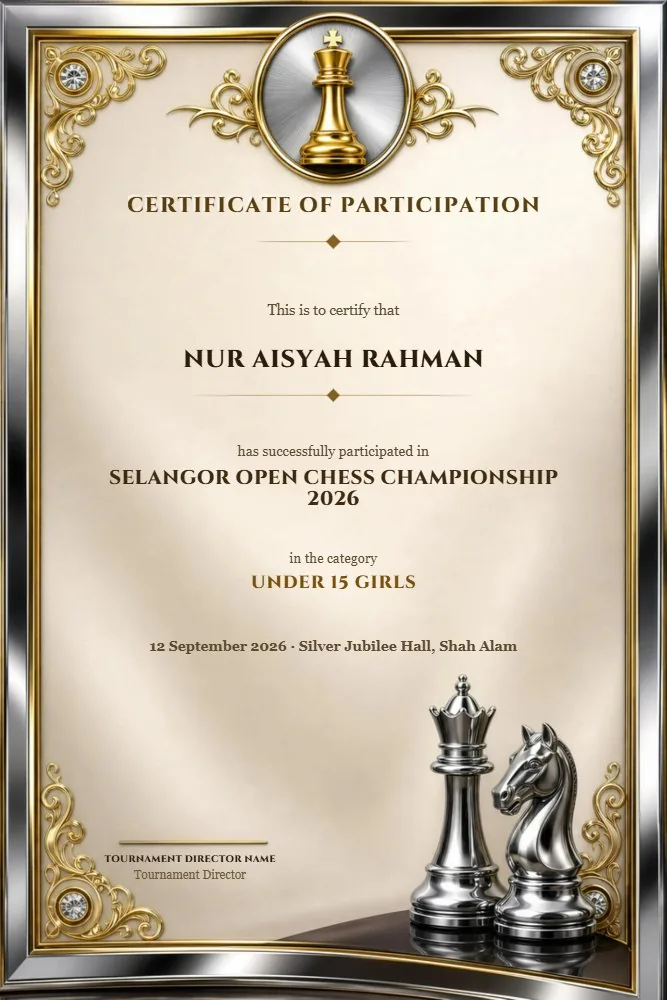
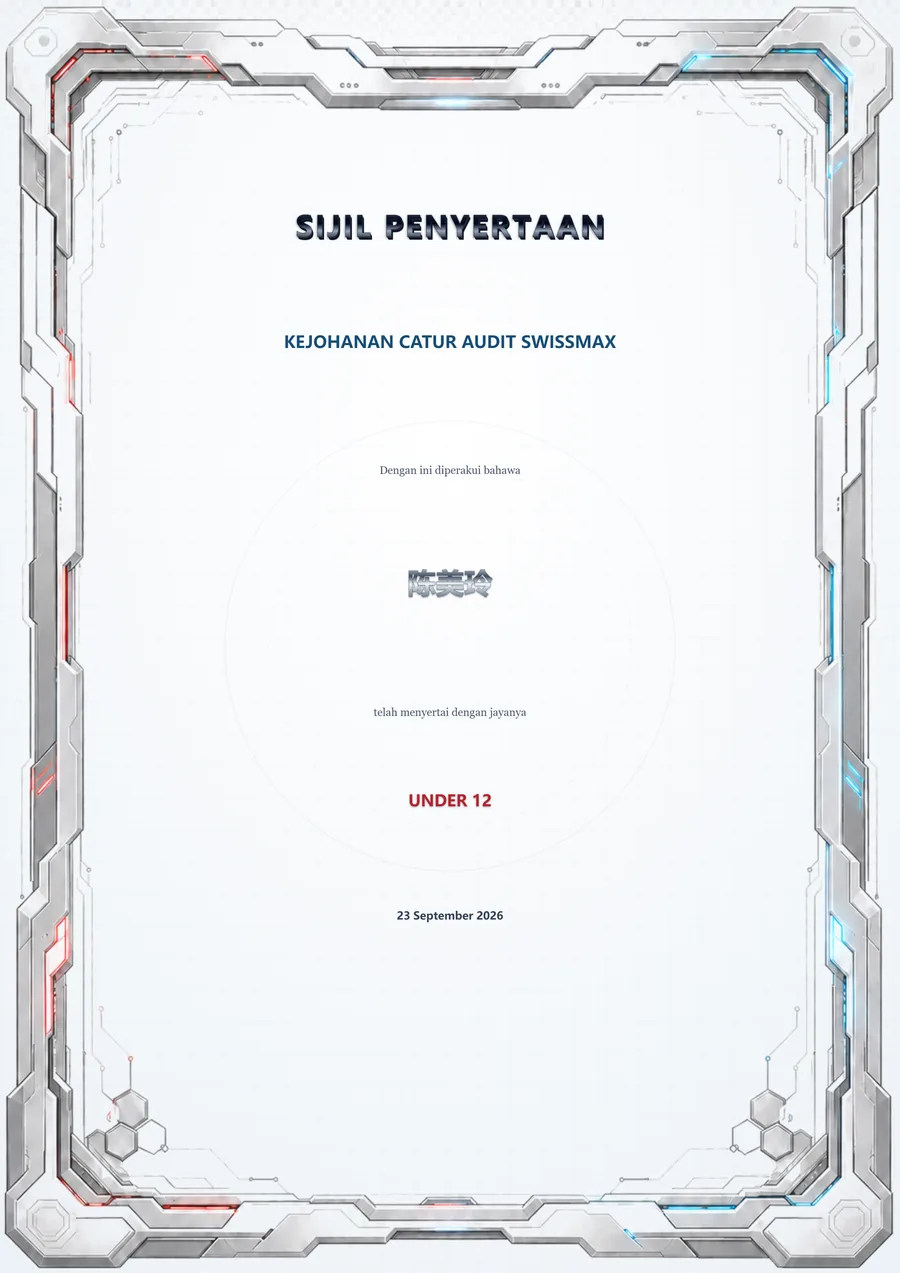
A SwissMax certificate in the Gold King Glass design with a named player and a signature
Every certificate named and signed.

The tournament day, stage by stage

Where the hours actually go.

Switch between the usual way and SwissMax. Each stage links to the full guide for that part of the app.

  1. 2–4 weeks before

    Registrations into a Swiss-Manager file

    Names, dates and IDs arrive in whatever format each parent typed. Players & Swiss-Manager files →

    The usual way

    • The form copied into Swiss-Manager's layout by hand, column by column
    • Birth dates in five formats, ages where a date should be
    • The same player twice, an ID typed in the wrong box

    With SwissMax

    • The form imported as it came, English or Malay headings matched
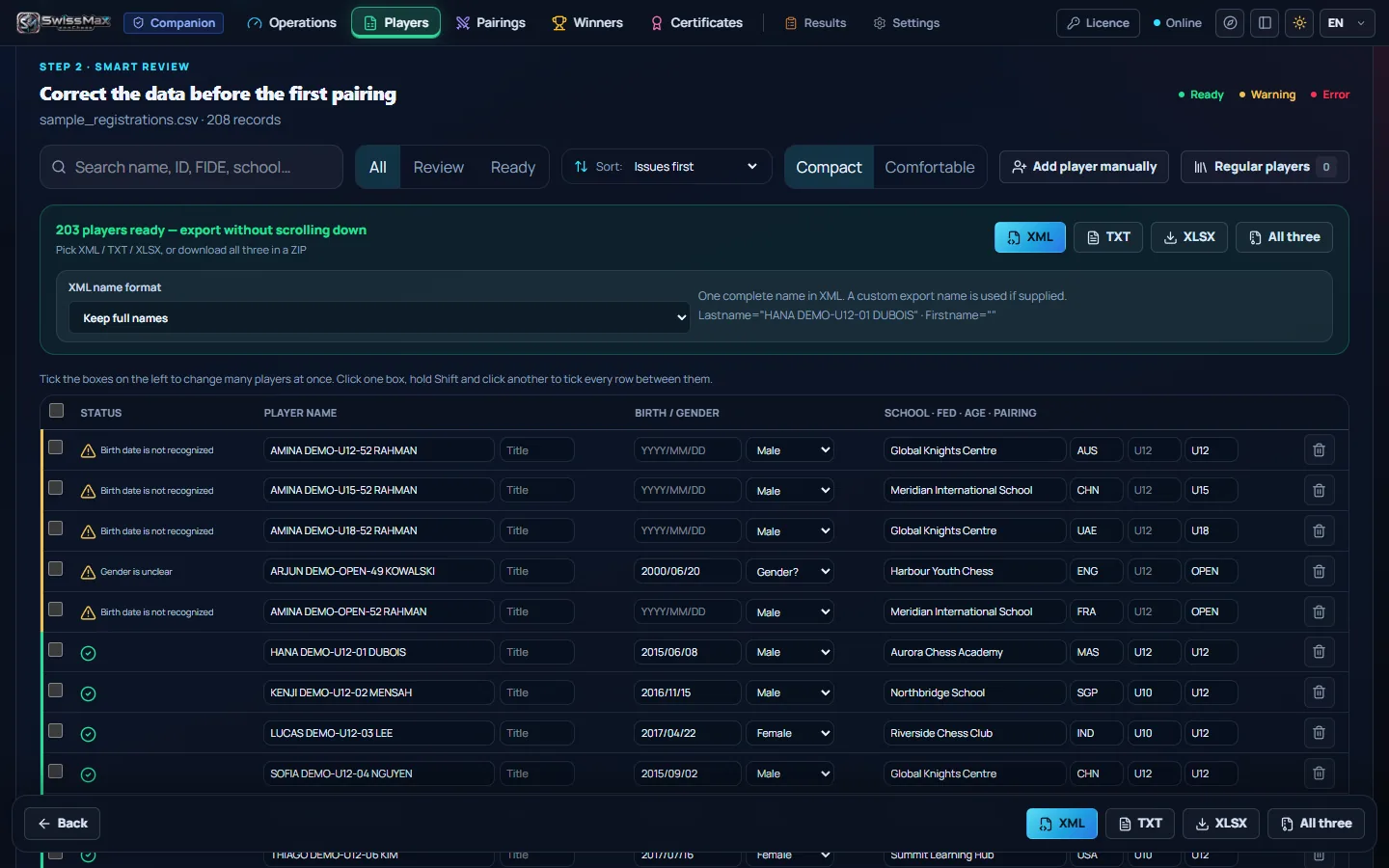
    • Every player marked Ready, Needs a look or Must be fixed
    • A Swiss-Manager XML, TXT or XLSX file, same player ID on every export
  2. Every round

    Pairings the whole hall can read

    Swiss-Manager pairs the round. Then everyone needs one answer: which board? Pairings & round results →

    The usual way

    • The whole hall refreshing one Chess-Results page at the same time
    • A cropped screenshot, names too small for a phone
    • A corrected pairing posted again, nobody sure what changed

    With SwissMax

    • A4 pages from your Chess-Results link or Swiss-Manager export
    • 104 boards on 7 readable pages, 14 designs, portrait or landscape
    • One image per page for WhatsApp, changed boards marked
  3. Every round

    Results from the boards

    The next round waits for the last result. LAN results →

    The usual way

    • Result slips carried to the desk and typed in one by one
    • One board reported twice, with two different results
    • Hard to see which boards are still missing

    With SwissMax

    • Helpers tap results on their phone's browser, nothing to install
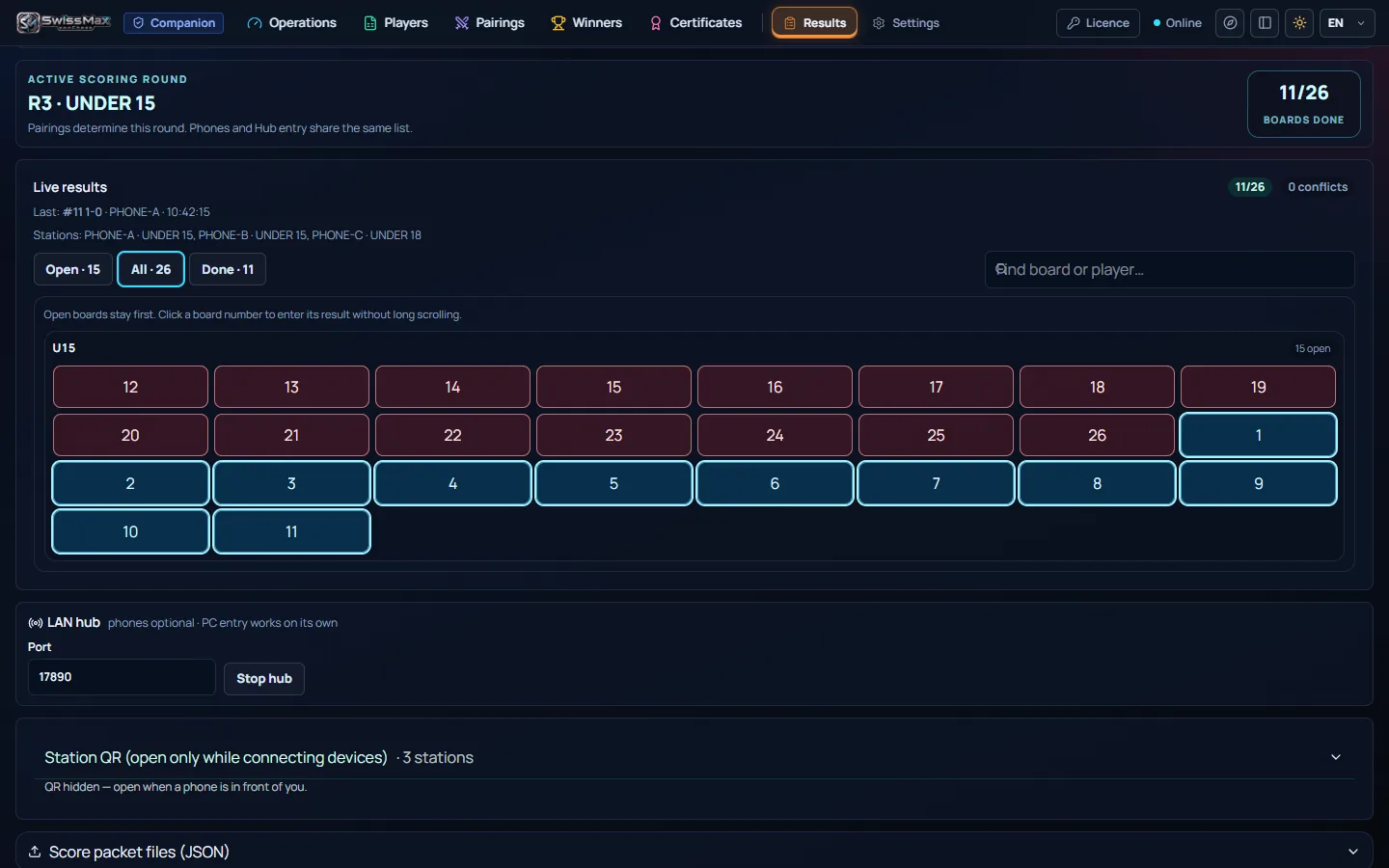
    • A conflict is held until you choose; open boards stay first
    • One Player-Results XML for Swiss-Manager per section
  4. After the last round

    Winners from the official ranking

    The list read out on stage should come from the ranking and your rules, not a tired count. Winners & reveal video →

    The usual way

    • Winners worked out by hand from a printed ranking
    • A player collects two prizes, or a category prize is missed
    • A winners poster rebuilt in a design app before prize-giving

    With SwissMax

    • Your prize scheme applied to the final ranking, one prize per player unless you choose otherwise
    • Tied ranks left to the arbiter; every slot checked before publishing
    • A table, a podium, a champion spotlight or an MP4 reveal from the same winners
  5. Before prize-giving

    Certificates with every name

    One typo means printing that page again. eCert Studio →

    The usual way

    • Names typed onto certificates one at a time
    • Chinese or Tamil names that the design app cannot set
    • A signature pasted in as a low-quality image

    With SwissMax

    • Every name filled from your ranking or list
    • Names in many scripts, a real signature photographed with your phone
    • The whole batch saved at once, 29 templates or your own design
  6. On the day

    Sharing with parents and players

    The same pages work for the wall, the hall screen and the parents' group. SwissMax overview →

    The usual way

    • A photo of a printed list posted to the group
    • The same question answered again and again at the desk

    With SwissMax

    • Pairing, result and winner images ready for WhatsApp, with text to copy
    • A winner reveal video, Story or Square, for the moment everyone shares
  7. After the event

    “How many points did I gain?”

    Players ask before the official list is out. Estimated ratings →

    The usual way

    • Rating changes worked out on a calculator for each player who asks

    With SwissMax

    • Likely FIDE and national rating changes, clearly marked as estimates; the federation's list stays official
    • The project, with its backups, kept for the next edition

Your hours, your numbers

How much work sits around one tournament?

Enter your event. The minutes per task are rough starting values; change them to what your team really spends. This is the manual work SwissMax is built to take over.

Clean and retype registrationsminutes per player0 h
Pairing sheets for wall and WhatsAppminutes per round, per section0 h
Typing result slips into Swiss-Managerminutes per board, per round0 h
Working out prize winnersminutes per section0 h
Names on certificatesminutes per certificate0 h
Winners poster and announcementminutes per section0 h

Hidden work for this event

0 h

About 0 working days of someone's time, much of it on the tournament day itself.

Starting values are illustrative estimates, not measurements. Your own numbers give your own answer.

Try it here

Three jobs, done in front of you.

Small demos with invented players. They show what SwissMax gives you back, written for this page; the app itself does far more.

A registration form, the way it really arrives.

Eight rows from a Google Form. Press Review: names and dates are made uniform, words such as “Lelaki”, “Girl” or “Bawah 12” become what Swiss-Manager expects, and anything doubtful is marked instead of guessed. Export waits until the error is fixed.

#NameBirth dateGenderCategoryStatus
8 rows from the form

In the app: Excel, CSV, ODS, XML, text PDF or a paste from Google Sheets; MCF, Malaysia's national rating list, and FIDE ID checks; a Regular Players library. Organizers elsewhere can ask for their own federation's list.

The final ranking and a prize scheme.

Overall 1st to 3rd, the best two under-10s and the best girl. Switch the one-prize-per-player rule off and on, and watch who moves.

RkPlayerCat.SexPts

In the app: your own prize groups (overall, categories, female, veteran, unrated, school or club, special awards), a cash total check, presets you reuse every event, tied ranks left to the arbiter, and a provisional mark until you set the ranking final.

104 boards, 7 pages, one name.

A round of 208 players on A4 pages. Type a name, the way a junior looks for theirs on the wall or in the parents' group.

Try

In the app: 14 designs, portrait for phones and landscape for screens, A4 at 300 DPI, every section in one ZIP, and the same designs for round results.

What comes out

The pages people actually see.

From the demo tournament with invented names. Click a picture to enlarge it.

SwissMax Players: the review table before exporting Players XML or TXT for Swiss-Manager
Registrations reviewedReady, needs a look, or must be fixed.
A SwissMax pairing page in the Royal Championship design with White and Black in separate columns and board numbers on both sides
Pairing pageWhite and Black in their own columns.
SwissMax Results via LAN: the hub that helper phones connect to on the venue network
Results from helper phonesOpen boards first, conflicts held.
SwissMax Winners: the Pick winners step with prize slots filled from the ranking
Winners suggestedFrom the ranking and your prize scheme.
A winners podium graphic in the Arena Gold design
Winners podiumFor the hall screen and the group.
A SwissMax certificate with a player's name in Chinese characters
Names in many scriptsEvery certificate, one batch.

How it differs

Spreadsheet, design app and WhatsApp, or one companion.

Most organizers already have a way that works. This is what changes when the pieces live in one place.

JobSpreadsheet + design app + WhatsAppSwissMax Companion
RegistrationsRetyped or pasted into Swiss-Manager's layout, checked by eyeImported as they came, every player given a status, exported for Swiss-Manager
Pairings on displayScreenshots and text listsA4 pages per section from the published round, changed boards marked
ResultsPaper slips typed in board by boardHelper phones on the venue network, one XML import
Prize winnersCounted by hand from a printoutSuggested from the ranking under your scheme, checked before publishing
CertificatesOne name at a time in a design appThe whole batch at once, names in many scripts, real signatures
No internet in the hallDepends on each toolSwiss-Manager files work fully offline
Pairings and official rankingSwiss-ManagerStill Swiss-Manager, by design

Clear boundaries

What SwissMax will not do.

No pairings

Swiss-Manager makes the pairings and the official ranking. SwissMax is not a pairing engine, on purpose.

No overruling

The arbiter keeps authority. Disputed results and tied ranks wait for a person to decide.

No uploads

Participant lists stay on your PC. Only public pages and lists you point to are read.

No official ratings

Rating changes are estimates. FIDE and the national federation remain authoritative.

Swiss-Manager's own .TUNX / .TURX tournament files are not read: export a TRF, or the pairing and ranking lists, instead. SwissMax is independent of Swiss-Manager and Chess-Results and not affiliated with or endorsed by them.

Words organizers use

A short glossary.

Swiss-Manager
The tournament program most arbiters use to make Swiss-system pairings and the official ranking.
Chess-Results
The public website where Swiss-Manager tournaments publish start lists, pairings and rankings.
TRF
The FIDE tournament report file, a plain-text export of a tournament that other programs can read.
Section
One group that is paired and ranked on its own, such as U12 or Open.
Prize scheme
The list of prizes per section and place, with rules such as one prize per player.
Tie-break
The rules Swiss-Manager uses to order players on the same points. The arbiter decides what a tie means for a prize.
Player-Results XML
A results file Swiss-Manager imports, so a round's results go in at once instead of board by board.
MCF
The Malaysian Chess Federation and its national rating list, built into SwissMax. Organizers in other countries can ask for their own federation's list.

FAQ

Questions organizers ask.

If SwissMax does not make pairings, why would an organizer need it?

Because pairing is only one part of running a tournament. The hours go into the work around it: cleaning registrations into a Swiss-Manager file, putting each round's pairings on the wall and in the parents' group, collecting results from the boards, working out prize winners from the final ranking, and printing certificates. SwissMax Companion handles that work on the organizer's PC, while Swiss-Manager keeps making the pairings and the official ranking.

What happens if Chess-Results is slow or down during a round?

SwissMax can work from the files Swiss-Manager exports on your PC, without the internet. Each round becomes A4 images for the wall and the hall screen, plus one image per page and a copy-ready text list for WhatsApp, so players, parents and coaches still get the pairing on time.

How long does it take to prepare the winners list?

Once the final ranking is loaded, SwissMax fills every prize slot from your scheme at once. Your time goes into checking the suggestions and any ties the arbiter must decide, so it depends on how many sections and prizes you have, not on counting by hand.

Can every player get a certificate with their own name?

Yes. eCert Studio fills in every player's name from the ranking or your list, adds a real signature captured by scanning a QR code with a phone, and saves the whole batch as 300-DPI PNG, PDF or a ZIP, ready to print or send to each player.

Does SwissMax replace Swiss-Manager?

No. Swiss-Manager makes the pairings and the official ranking, and the arbiter keeps authority over them. SwissMax prepares the player file Swiss-Manager imports, reads what Swiss-Manager publishes, and turns it into pages, results files, winners lists and certificates.

Do I need Chess-Results or the internet?

No. SwissMax can read a Chess-Results link, but it also opens the files Swiss-Manager exports (TRF, or pairing and ranking lists as Excel, CSV, HTML, text PDF or XML), and files work fully offline. Helper phones send results over the venue network, not the internet.

How does SwissMax pick prize winners?

It fills each prize slot from the final ranking, in ranking order, following the prize scheme you set and your duplicate-prize rule (new schemes give one prize per player unless you choose otherwise). It suggests; you decide. Tied ranks are left to the arbiter, and nothing is exported while a prize is unresolved.

Which rating lists does it know?

FIDE IDs, and MCF, Malaysia's national rating list, are built in. SwissMax was built and field-tested in Malaysia; organizers elsewhere who want their own federation, league, club or school rating supported are welcome to get in touch.

Does tournament data leave my PC?

Tournament data is processed on the organizer's PC and participant lists are not uploaded. SwissMax only downloads public pages and lists, such as a Chess-Results link you paste.

What does it run on, and can I try it?

SwissMax Companion runs on Windows 10 and 11 (64-bit), in English, Bahasa Melayu and Chinese. The trial is free for 14 days with every Companion feature, with no key or payment details.

Your next tournament

Spend the day on the event, not on the paperwork.

Try every Companion feature free for 14 days on Windows. No key, no payment details. Plan the event with the checklist first, then let SwissMax take the jobs around Swiss-Manager.