
⏱
No retyping
The form's columns are matched to Swiss-Manager's fields, so nobody types the list in again by hand.

SwissMax · Players & Swiss-Manager files
Works beside Swiss-ManagerRegistration rarely arrives as a tournament file. Names, dates, IDs and categories come in whatever format each parent typed. SwissMax reads the form as it came, shows what needs a look, and writes the player file Swiss-Manager imports.
Updated
Why it matters
Entries come from a Google Form, a spreadsheet and a few late WhatsApp messages, with ratings, IDs, clubs, categories and spelling in different formats. Someone has to clean that list before it goes into Swiss-Manager. The best time is before Round 1 is paired.
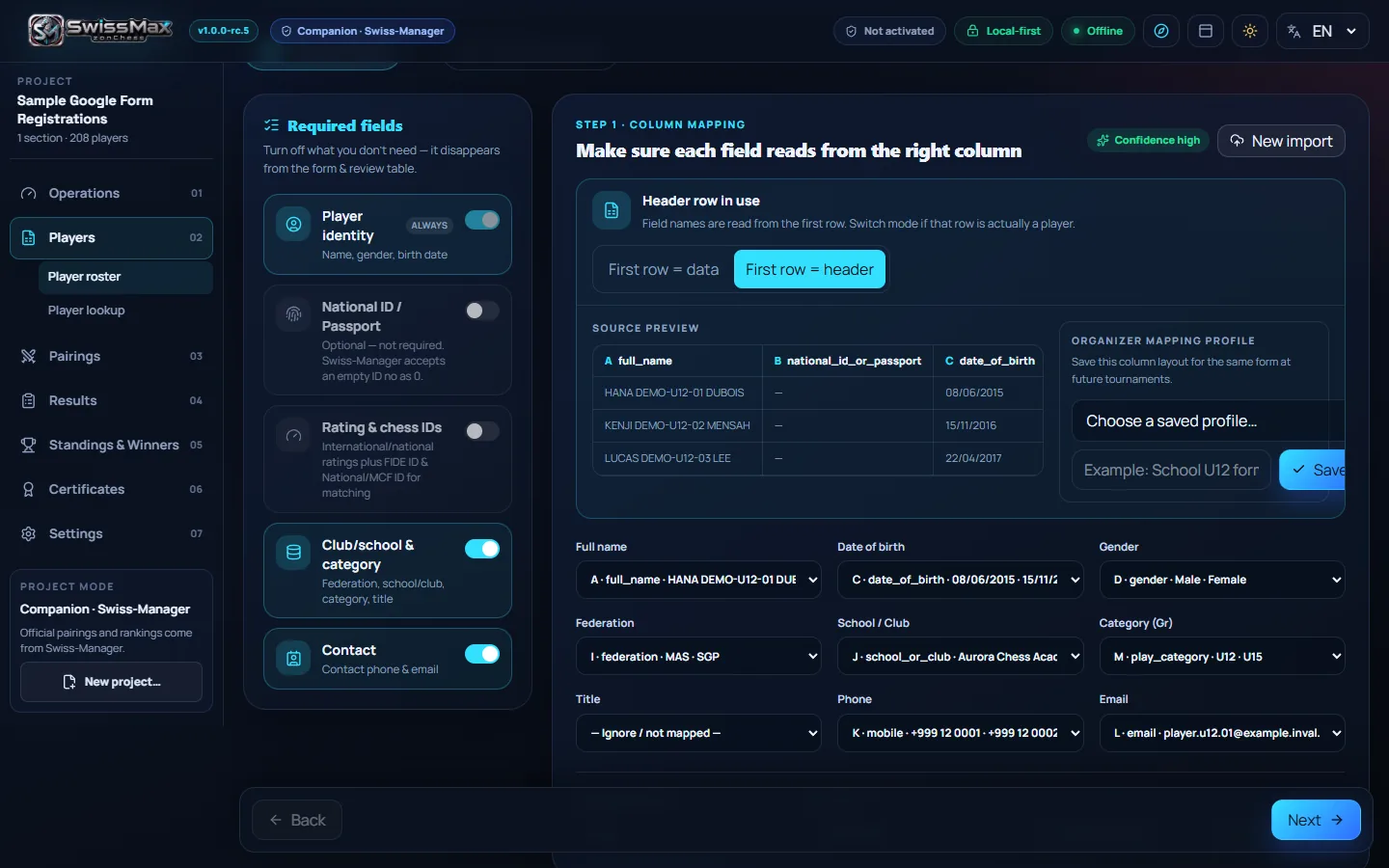
The form's columns are matched to Swiss-Manager's fields, so nobody types the list in again by hand.
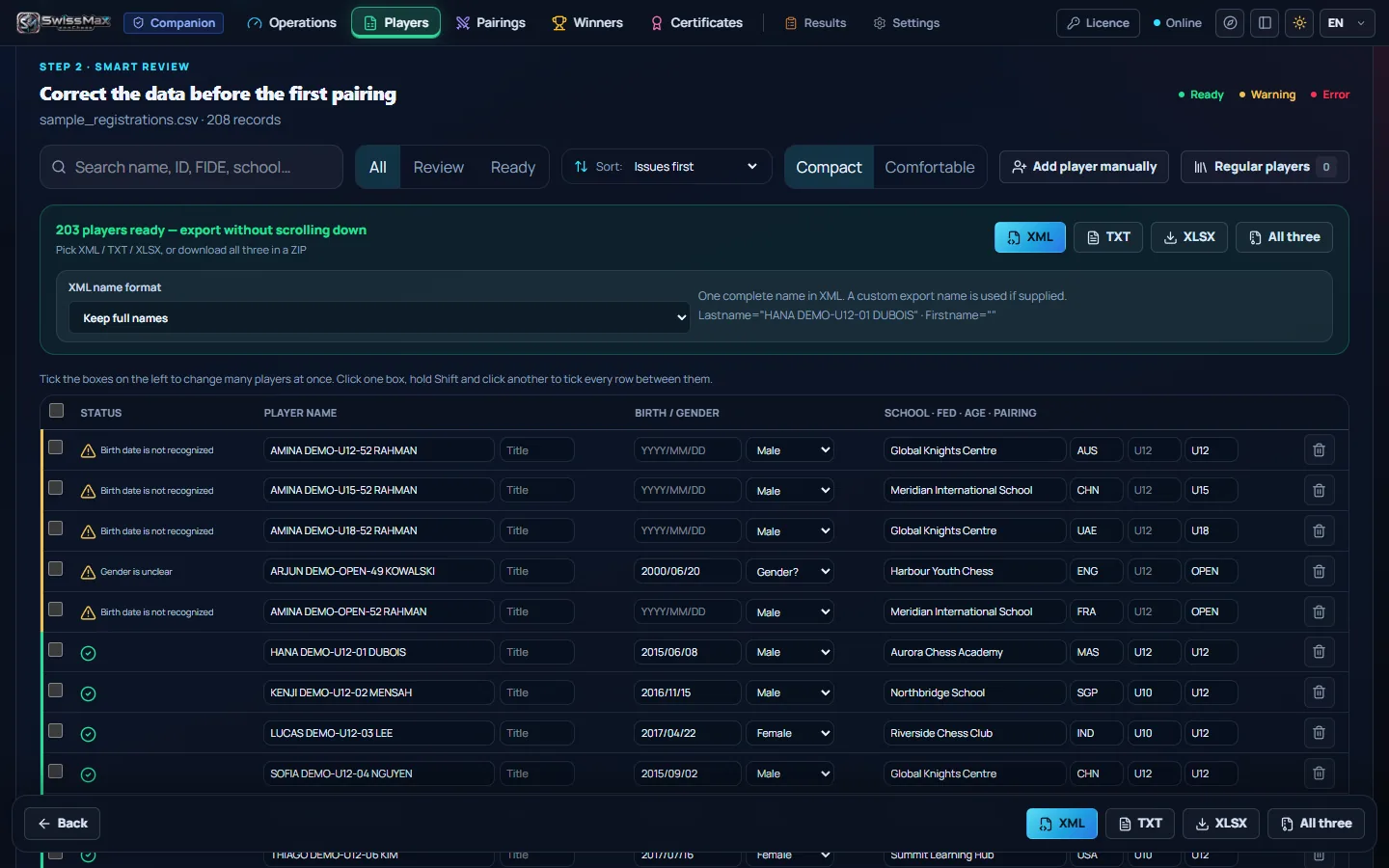
The review shows what is ready and what needs a look, and export waits until the errors are fixed.
SwissMax prepares the player file. Swiss-Manager still makes the pairings and the official ranking.
Drop in the file the form or spreadsheet gave you, or copy the cells from Google Sheets and paste them in. SwissMax reads the column headings, in English or Malay, and suggests which column feeds each field. Check the suggestions, change any that are wrong, and carry on.
02 · Review & clean
After mapping, every player gets a status. The roster counts how many are ready, how many need attention and how many have errors, and you can show only the ones to review. Export waits until the errors are fixed.
UPPERCASE, Title Case or as entered, for the whole list. For a long name, SwissMax can suggest a shorter export name without changing the full name.
Dates written different ways become one format. A birth year on its own stays a year, so no birthday is made up. A column of ages can become birth years if you choose.
Male, Female, Lelaki, Perempuan, Boy, Girl and their short forms are understood. “Under 12” or “Bawah 12” becomes U12, and Open or Terbuka becomes OPEN.
The same National ID or passport, the same FIDE ID, or the same name with the same birth date is flagged, and must be sorted out before export.
Players are matched against the MCF rating list. An exact MCF or FIDE ID match is confirmed automatically; a match on name alone waits for you. IDs that look swapped are flagged, and swapped only when you say so.
Values you fix stay when you change the mapping or import the same form again with newer answers. Anything uncertain is held for you to review.
Rating checks can be off, optional or required; when required, export waits until every rating is confirmed. MCF is Malaysia's national rating list. If you run events elsewhere and want your own federation or club rating handled the same way, tell us.
When the list is ready, export it in the format your Swiss-Manager workflow uses. The XML goes in through File → Import Players (XML), and the TXT through Data Import/Export with a semicolon. The XLSX is a review sheet for people to check, not for import. Or take all three in one ZIP.
Each player keeps the same XML player ID when you export again: after a corrected name or rating, a late entry, a new order or the same form imported again. The new file lines up with the one you sent before. The XML ID is not the starting number; Swiss-Manager still sets that.
Correct the list and export again: each player keeps the same XML player ID, so the new file lines up with the one you sent before.
When the list has more than one Gr code, the ZIP adds a separate TXT and XML for each group.
Registrations carry federation, FIDE ID and national ID or passport, and the federation code is checked for the three letters Swiss-Manager expects.
SwissMax prepares the player file only. Swiss-Manager still makes the pairings and the official ranking.
04 · Lookup & regular players
Two tools for the moments a form does not cover: looking up a single player's record, and adding players you already know without typing them again.
Search by FIDE ID or MCF ID and see one card for the player: FIDE standard, rapid and blitz ratings with games played, the MCF rating, and an estimate of how long they have been an active MCF player. Add the other ID to the same card, then add the player to your registration list.
Build your club roster once and reuse it. Save the current list to the library, then choose regular players into the next event's registration, or start with them when there is no Google Form at all.
Want each player's likely FIDE and MCF rating change after the event? See Estimated ratings.
Frequently asked
Excel (XLS, XLSX, XLSM), CSV, TSV, ODS, XML or a text-layer PDF, with or without a header row. You can also copy the cells from Google Sheets and paste them in. Column headings in English or Malay are matched for you, and you can change any match before you continue.
Export the XML and use File → Import Players (XML), or export the TXT and use Data Import/Export with a semicolon as the delimiter. The XLSX is only for people to review. The ZIP holds all three with a short README of these steps; when you import the XML, Swiss-Manager asks whether to delete the players it already has.
Fix it and export again. Each player keeps the same XML player ID after a corrected name or rating, a late entry, a new order or the same form imported again, so the new file lines up with the one you sent before. If the change comes after a pairing, the checklist reminds you to use Input → Resort in Swiss-Manager.
No. Participant lists are processed on your PC and never uploaded, and your original files are never modified. When SwissMax refreshes the MCF list or downloads the FIDE archive, it only downloads public files, and FIDE lookups then run on the PC, so no player names are sent to FIDE.
Yes. Import, cleanup, duplicate checks and the Swiss-Manager export are not country-specific, and registrations carry federation, FIDE ID and national ID or passport. MCF is the Malaysian Chess Federation's national rating list; if you want your own federation, league or club rating handled the same way, get in touch.
Yes. Players, Player Lookup and the Swiss-Manager export are part of SwissMax Companion. SwissMax Companion is RM160 or USD39.99 for one PC, paid once, with perpetual use of eligible versions and two years of free updates and support. Waitlist members get 50% off. The 14-day trial includes every Companion feature.
More in SwissMax
A named certificate for every player, with real signatures captured by phone.
Read more →A4 pairing and results pages that look like a broadcast graphic, from one Chess-Results link.
Read more →Prize schemes from the official ranking, winner posters and a reveal video.
Read more →Messy registration forms in, a clean Swiss-Manager file out.
You are hereHelper phones send each board's result to the organizer PC.
Read more →Each player's likely FIDE and MCF change, before results go official.
Read more →RM160 / USD39.99 · 50% off for the waitlist
Try it free for 14 days, with no key or payment details. Join the waitlist for 50% off the Companion licence when sales open, and launch news before anyone else.